유니티3D - 9
이번 목표
죽었을 때 AI가 총을 드랍하고 UI를 만들어 플레이어와 상호작용하여 픽업이 가능하게해보자.
총기 드랍
WeaponComponent에서 드랍을 처리하고, 드랍된 아이템을 관리하는 DropItem 클래스를 분리한다. 드랍 데이터는 ScriptableObject 기반으로 외부화해 순환참조를 피하고, 프리팹/이름/아이콘 등 메타데이터를 한 곳에서 관리한다.
1
2
3
4
5
6
7
8
9
10
11
12
13
    public void DropWeapon()
    {
        if (CurrentWeapon == null) return;

        DropData dropData = CurrentWeapon.Dropdata; // 현재 무기에서 드랍 데이터 추출

        GameObject dropObj = Instantiate(dropData.DropPrefab, transform.position, Quaternion.identity);
        DropItem dropItem = dropObj.GetComponent<DropItem>();
        dropItem.Init(dropData);

        Destroy(CurrentWeapon.gameObject);
        CurrentWeapon = null;
    }
이런식으로 현재무기에서 DropData를 가져와서 생성해주고 Init함수에서 캐싱한 후 현재무기를 지워주도록하자.
DropData에 프리펩만 잘 들어있다면 씬에 잘 Drop될 것이다.
이어서 DropItem 스크립트를 작성해보자.
일단 콜리더를 이용해 플레이어가 들어오면 Ui를 띄어주기로 하자 그러기 위해선 또 새로운 ItemUIManager 스크립트를 작성하자.
어디서든 UI매니저에 접근할 수 있게 싱글톤처럼 사용하겠다.
1
2
3
4
5
6
7
8
9
10
11
12
13
14
15
16
17
18
19
20
21
22
23
24
25
26
27
28
29
30
31
32
33
34
35
using TMPro;
using UnityEngine;

public class ItemUIManager : MonoBehaviour
{
    public static ItemUIManager Instance;

    [SerializeField] private GameObject promptUI;
    [SerializeField] private TextMeshProUGUI itemNameText;

    void Awake()
    {
            if (Instance != null && Instance != this)
    {
        Destroy(gameObject);
        return;
    }

    Instance = this;
        promptUI.SetActive(false);
    }

    public void ShowPrompt(string itemName)
    {
        itemNameText.text = itemName;

        promptUI.SetActive(true);
    }

    public void HidePrompt()
    {
        promptUI.SetActive(false);
    }
}
ItemUIManager로 프롬프트를 관리하고, DropItem 트리거에서 On/Off 한다.
1
2
3
4
5
6
7
8
9
10
11
12
13
14
15
16
17
18
19
20
21
22
23
24
25
26
27
28
29
30
31
32
33
34
35
36
37
using UnityEngine;

public class DropItem : MonoBehaviour
{
    [SerializeField] BoxCollider BoxCollider;
    public DropData dropData;
    public float rotationSpeed = 100f;

    public void Init(DropData data)
    {
        dropData = data;
    }

    private void Update()
    {
        transform.Rotate(Vector3.up * rotationSpeed * Time.deltaTime);
    }

    private void OnTriggerEnter(Collider other)
    {
        if (other.CompareTag("Player"))
        {
            // UI 표시
            ItemUIManager.Instance.ShowPrompt(dropData.Name);
        }
    }

    private void OnTriggerExit(Collider other)
    {
        if (other.CompareTag("Player"))
        {
            // UI 숨기기
            ItemUIManager.Instance.HidePrompt();
        }
    }
}
UI레이캐스트
의도한대로 잘된다. 유니티는 한글폰트가 지원이 안되서 폰트를 따로 가져와서 등록을하고 만들어줘야한다.
주의할점으로 필자도 처음에 가져온폰트가 그대로 네모모양으로 깨져서 한글이 지원이 안되는 폰트인가 했는데 Size조절을 해줘야한다. 너무 커서 네모로 깨졌던 것…
이제 잘 드롭되니 픽업을 해보도록하자.
픽업
트리거에서 이제 플레이어에게 아이템 정보를 넘기고 F키를 눌러 픽업하는 코드를 구성해보자.
1
2
3
4
5
6
7
8
9
10
11
12
13
14
15
16
17
18
19
20
21
22
23
24
25
26
27
28
29
30
31
32
33
34
35
36
37
38
39
40
41
using UnityEngine;

public class DropItem : MonoBehaviour
{
    [SerializeField] BoxCollider BoxCollider;
    public DropData dropData;
    public float rotationSpeed = 100f;

    public void Init(DropData data)
    {
        dropData = data;
    }

    private void Update()
    {
        transform.Rotate(Vector3.up * rotationSpeed * Time.deltaTime);
    }

    private void OnTriggerEnter(Collider other)
    {
        if (other.CompareTag("Player"))
        {
            // UI 표시
            ItemUIManager.Instance.ShowPrompt(dropData.Name);
            PlayerController PC = other.GetComponent<PlayerController>();
            PC.SetPickUp(true, this);
        }
    }

    private void OnTriggerExit(Collider other)
    {
        if (other.CompareTag("Player"))
        {
            // UI 숨기기
            ItemUIManager.Instance.HidePrompt();
            PlayerController PC = other.GetComponent<PlayerController>();
            PC.SetPickUp(false, null);
        }
    }
}
이제 PC에서 WeaponComponent와 상호작용을 구성해보자.
1
2
3
4
5
6
7
8
9
10
11
12
13
14
15
16
17
18
19
20
21
22
23
24
25
26
27
28
29
30
    public void OnPickUp(InputAction.CallbackContext context)
    {
        if (context.performed)
        {
            if (PickUp == true && dropItem != null)
            {
                weapon.PickUpItem(dropItem);
                Destroy(dropItem);
                dropItem = null;
            }
        }
    }

public class WeaponComponent : MonoBehaviour
{
        public void PickUpItem(DropItem gunWeapon)
    {
        if (CurrentWeapon == null)
        {
            CurrentWeapon = Instantiate(gunWeapon.dropData.GunWeapon, Hand_R);
            CurrentWeapon.SetOwner(gameObject);
        }
        else
        {
            DropWeapon();
            CurrentWeapon = Instantiate(gunWeapon.dropData.GunWeapon, Hand_R);
            CurrentWeapon.SetOwner(gameObject);
        }
    }
}
픽업문제영상
문제: 드랍 삭제와 장착이 동시에 일어나면서 장착 누락이 발생했다. 트리거 박스 끝단에서의 왕복 문제도 있어 UI 토글이 불안정했다.
디버깅 결과 DropData의 GunWeapon 참조가 null로 떨어졌다. 자기 자신 타입을 내장한 구조(순환참조)와 직렬화 꼬임이 원인이므로 ScriptableObject로 구조를 교체했다.
이제 내코드에서 문제점을 고쳐야한다.
1
2
3
4
5
6
7
8
9
10
11
12
13
14

[System.Serializable]
public struct DropData
{
    public GameObject DropPrefab;
    public GunWeapon GunWeapon;
    public string Name;
}

public abstract class GunWeapon : MonoBehaviour
{
    public GunData data;
    public DropData Dropdata;
}
위에 코드처럼 자기자신의 클래스에서 만든 구조체에 자신클래스가 들어가는게 문제이다.
언리얼에서는 c++로 아마 *변수로 처리했는데 이게 안되는거 같다. 그래서 해결법으로는 ScriptableObject 상속하여 DropData 클래스를 만들어서 관리를 해야한다고 한다.
ScriptableObject를 한 번 사용해봤는데 이게 아마 언리얼의 데이터에셋이랑 비슷하다고 한다.
문제를 해결하고 이제 픽업을 했을때나 Ai가 죽었을때 무기를 드롭하는데 이 때 총을 날려주자 Rigidbody를 이용하겠다.
1
2
3
4
5
6
    public void OnDrop(Vector3 Direction)
    {
        float force = 1f;
        Rigidbody.AddForce(Direction * force, ForceMode.Impulse);
    }
각자의 컨트롤러에서 방향을 받아 적당한 힘으로 날려주었다.
픽업 UI는 “플레이어 에임과 교차”할 때만 켠다.
- dropItem 코드
1
2
3
4
5
6
7
8
9
10
11
12
13
14
15
16
17
18
19
20
21
22
23
24
25
26
27
28
29

  public void OnUIItem()
  {
      ItemUIManager.Instance.ShowPrompt(dropData.Name);
  }

  public void OffUIItem()
  {
      ItemUIManager.Instance.HidePrompt();
  }

  private void OnTriggerEnter(Collider other)
  {
      if (other.CompareTag("Player"))
      {
          PlayerController PC = other.GetComponent<PlayerController>();
          PC.SetPickUp(true, this);
      }
  }

  private void OnTriggerExit(Collider other)
  {
      if (other.CompareTag("Player"))
      {
          PlayerController PC = other.GetComponent<PlayerController>();
          PC.SetPickUp(false, null);
          OffUIItem();
      }
  }
- Player 코드
1
2
3
4
5
6
7
8
9
10
11
12
13
14
15
16
17
18
19
20
21
22
23
24
25
26
27
28
29
30
31
32
33
34
35
36
37
38
39
40
41
42
43
 void Update()
 {
     if (PickUp)
     {
         OnUIRaycast();
     }
 }

 private void OnUIRaycast()
 {
     Camera cam = Camera.main;
     Vector3 origin = cam.transform.position;
     Vector3 direction = cam.transform.forward;

     if (Physics.Raycast(origin, direction, out RaycastHit hit, rayDistance, dropItemLayer))
     {
         DropItem dropItem = hit.collider.GetComponent<DropItem>();
         dropItem.OnUIItem();
         currentTarget = dropItem;
     }
     else
     {
         if (currentTarget != null)
         {
             currentTarget.OffUIItem();
         }
     }
 }

     public void OnPickUp(InputAction.CallbackContext context)
  {
      if (context.performed)
      {
          if (PickUp == true && dropItem != null)
          {
              weapon.PickUpItem(dropItem);
              Destroy(dropItem.gameObject);
              currentTarget.OffUIItem();
              currentTarget = null;
              dropItem = null;
          }
      }
  }
정리: DropItem은 UI On/Off API만 제공한다. Player는 카메라 전방 레이캐스트로 DropItem 레이어만 검사해, 교차 시 UI On 및 currentTarget 캐시, 벗어나면 UI Off로 일관되게 관리한다.
무기픽업 완성
- 이 작업을 하면서 얻은점 레이어 개념을 “오브젝트 레벨 레이어”와 “충돌 필터”로 분리해 이해한다.
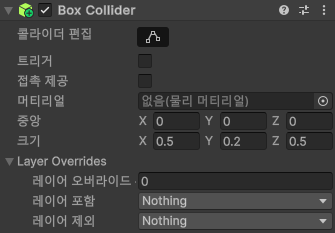 레이어 포함 부분에 내가 DropItem을 하면 이 BoxCollider는 DropItem레이어인 상태인줄알고 진행했다.
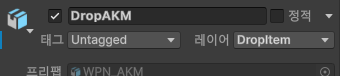 실제로는 이 게임 오브젝트 레이어 설정으로 진행되는 것.
이 아이템 범위 즉 플레이어가 픽업범위에 들어오는 용도로 사용하는 Sphere콜리더에 자꾸 RayCast가 충돌하여 에임에 아이템이 안들어와도 UI가 켜졌다.
여기서 이제 DropItem레이어가 아닌데 왜 이게 충돌이 되지? 하는 의문점이 생겨서 개념이 확실히 정리가 될수있었다.
즉 Collider에 레이어 포함은 현재 게임 오브젝트가 충돌되지않는 레이어와 충돌이 가능하게끔 해주는 역할이였다.
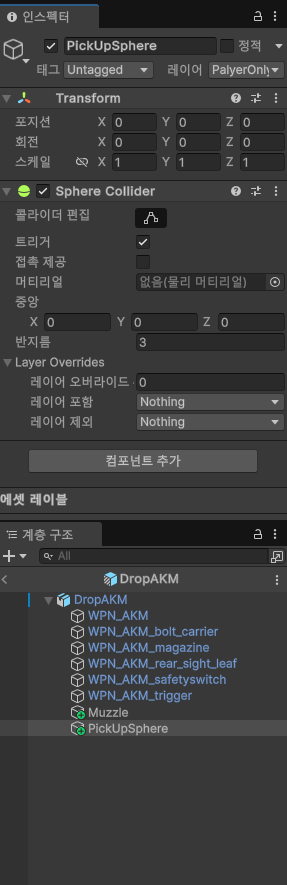 나는 그래서 그림처럼 DropAKM프리펩에 빈오브젝트를 하나 더 추가하여 PlayerOnly레이어를 만들어 이 오브젝트 레이어에 할당해주었다.
유니티는 콜라이더별 레이어가 아니라 오브젝트 레벨로 지정한다. “레이어 포함”은 충돌 불가 레이어를 예외적으로 허용하는 필터 설정임을 기억한다.
레이어 예시영상
영상과 같이 Player와 충돌이 적용되어 올라갔다가 다시 바꾸면 적용되지않아 내려가는 모습을 볼 수 있다.
UI 방식은 월드/스크린 중 스크린이 이번 콘셉트에 적합했다.
UI방식영상