유니티3D - 6
이번 목표
액션 구조 정리, AI 기본 이동
구조 정리
일단 문제였던 애니메이션 델리게이트 부분에서 무기를 장착할 때 보다는 무기를 WeaponComponent에 넣었을 때 즉 무기를 획득했을 때 구독을 하기로 하자
그리고 게임 내에서 UI로 무기를 교체할 것인지 , 주어서 교체할 것인지 생각해봐야한다.
내가 원하는 최종 결과물은 AI에게도 총이 있어 그 소굴을 클리어하는것이 목표니 주어서 사용이 일단 일반적이다.
UI와도 상호작용 가능하게 첫 무기는 선택이 가능하도록 하겠다. 결론은 둘다 구현을 하는 방향으로 생각해보자..
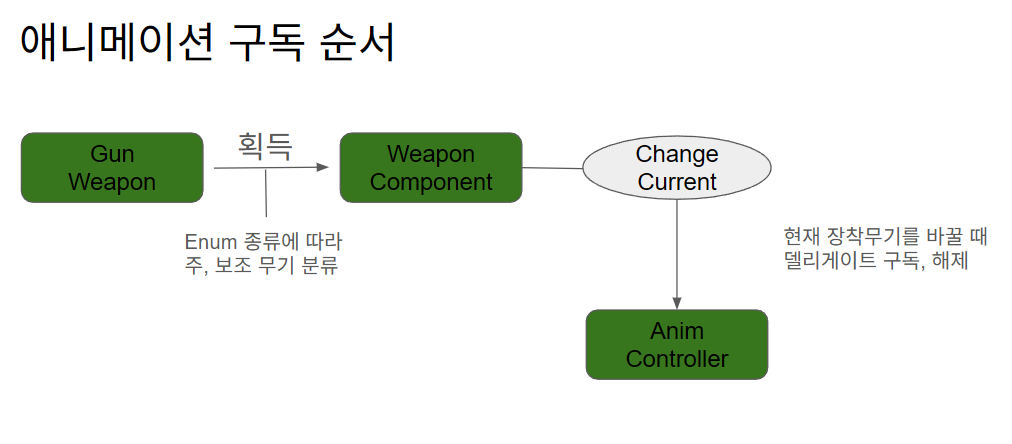
애니메이터에 파이어트리거는 하나고 피스톨과 주무기를 구분해야한다. 이럴때 AnimatorOverrideController 이용하는 방법이 있는 거 같다.
여기서 구독/해제 타이밍을 “무기 장착/획득 시점”으로 일관되게 맞추면 이벤트 흐름이 안정된다. 또한 Player와 AI의 발사 원점/방향 제공은 인터페이스(예: AimInfo/GetFireInfo)로 통일하면 이동 주체가 달라도(Agent vs CharacterController) 무기 시스템 결합도가 낮아진다.
AI 기본 이동 (BT)
간단한 BT를 만들어 플레이어 인식부터 확인한다.
패키지 관리자(유니티 레지스트리)에서 Behavior를 설치하면 BT/BB를 만들 수 있다.
Action에 patrol을 추가하고 BB에 게임오브젝트 리스트 변수를 둔다.
NavMesh Surface를 베이크한 뒤 이동시켜보니 0→1→2→0 순환만 된다. 왕복을 위해서는 patrol 대신 NavMeshAgent로 목표를 지정하는 편이 깔끔했다.
- 코드 구현 Ai 컨트롤러와 Action 노드 코드
일단 컨트롤러에서 Agent를 이용한 이동코드를 구현한다.
1
2
3
4
5
6
7
8
9
10
11
12
13
14
15
16
17
18
19
20
21
22
23
24
25
26
27
28
29
30
31
32
33
34
35
36
37
38
39
40
41
42
43
44
45
46
47
48
49
50
51
52
53
54
55
using UnityEngine;
using UnityEngine.AI;
using Unity.Behavior;

public class AIController : MonoBehaviour
{
    private BehaviorGraphAgent behaviorGraphAgent;
    public Transform[] WayPoint;
    private NavMeshAgent agent;

    private int targetIndex = 0;
    private int direction = 1; // 1: 정방향, -1: 역방향

    [SerializeField] private bool isLooping = true; // true: 순환, false: 왕복

    void Start()
    {
        behaviorGraphAgent = GetComponent<BehaviorGraphAgent>();
        agent = GetComponent<NavMeshAgent>();
        agent.SetDestination(WayPoint[0].position);
    }

    void Update()
    {
    }

    public void SetPatrol()
    {
        if (agent.pathStatus == NavMeshPathStatus.PathComplete &&
            agent.remainingDistance - agent.stoppingDistance < 0.1f)
        {
            if(isLooping)
            {
                targetIndex = (targetIndex + 1) % WayPoint.Length;
            }
            else
            {
                if (targetIndex == 0)
                {
                    direction = 1;
                }
                else if (targetIndex == WayPoint.Length - 1)
                {
                    direction = -1;
                }

                targetIndex += direction;
                targetIndex = Mathf.Clamp(targetIndex, 0, WayPoint.Length - 1);
            }

            agent.SetDestination(WayPoint[targetIndex].position);
        }
    }
}
그리고 Action노드에서 일단 실행시키는 코드이다.
1
2
3
4
5
6
7
8
9
10
11
12
13
14
15
16
17
18
19
20
21
22
23
24
25
26
27
28
29
30
31
32
33
34
35
36
37
38
39
40
41
using System;
using Unity.Behavior;
using UnityEngine;
using Action = Unity.Behavior.Action;
using Unity.Properties;
using UnityEngine.AI;
using UnityEngine.InputSystem.XR;

[Serializable, GeneratePropertyBag]
[NodeDescription(name: "AIPatrol", story: "[Self] 이동할캐릭터", category: "Action", id: "cc1ab74039e6a0db09484e91cfe64b34")]
public partial class AiPatrolAction : Action
{
    [SerializeReference]
    public BlackboardVariable<GameObject> Self;

    private NavMeshAgent Agent;
    private AIController Controller;

    protected override Status OnStart()
    {
        GameObject AI = Self.Value;

        if (AI == null) return Status.Failure;

        Controller = AI.GetComponent<AIController>();
        if (Controller == null) return Status.Failure;

        return Status.Running;
    }

    protected override Status OnUpdate()
    {
        Controller.SetPatrol();

        return Status.Running;
    }

    protected override void OnEnd()
    {
    }
}
루핑 true
루핑 false
사실 이 방법이 맞는지는 모르겠다. 그리고 AI애니매이션이 나오지않는다. 그런데 캐릭터무브먼트부분에서 AI와 Player를 구분해야하나? 지금 여러 구조로 인한 머리가 아프다. 천천히 시간을 쓰면서 생각해봐야겠다. 언리얼을 할 때는 이런부분들이 이미 구현되어 있거나 명확히 나뉘어져 있어 편했는데 처음부터 내가 짜려고 하니 정말 어려운 부분들이 많은 거 같다.
추가로 BT(Action) 갱신 주기에서는 회전/발사/상태 전이를 분리해 레이스 컨디션을 줄이는 편이 디버깅과 확장에 유리했다.